
What Is a Virtual Private Network?
Every time you connect to the internet, you leave a trail. Your internet provider sees it. Advertisers track it. Hackers exploit it. A VPN changes that — here’s exactly how, from the packets up.
The Plain-English Definition
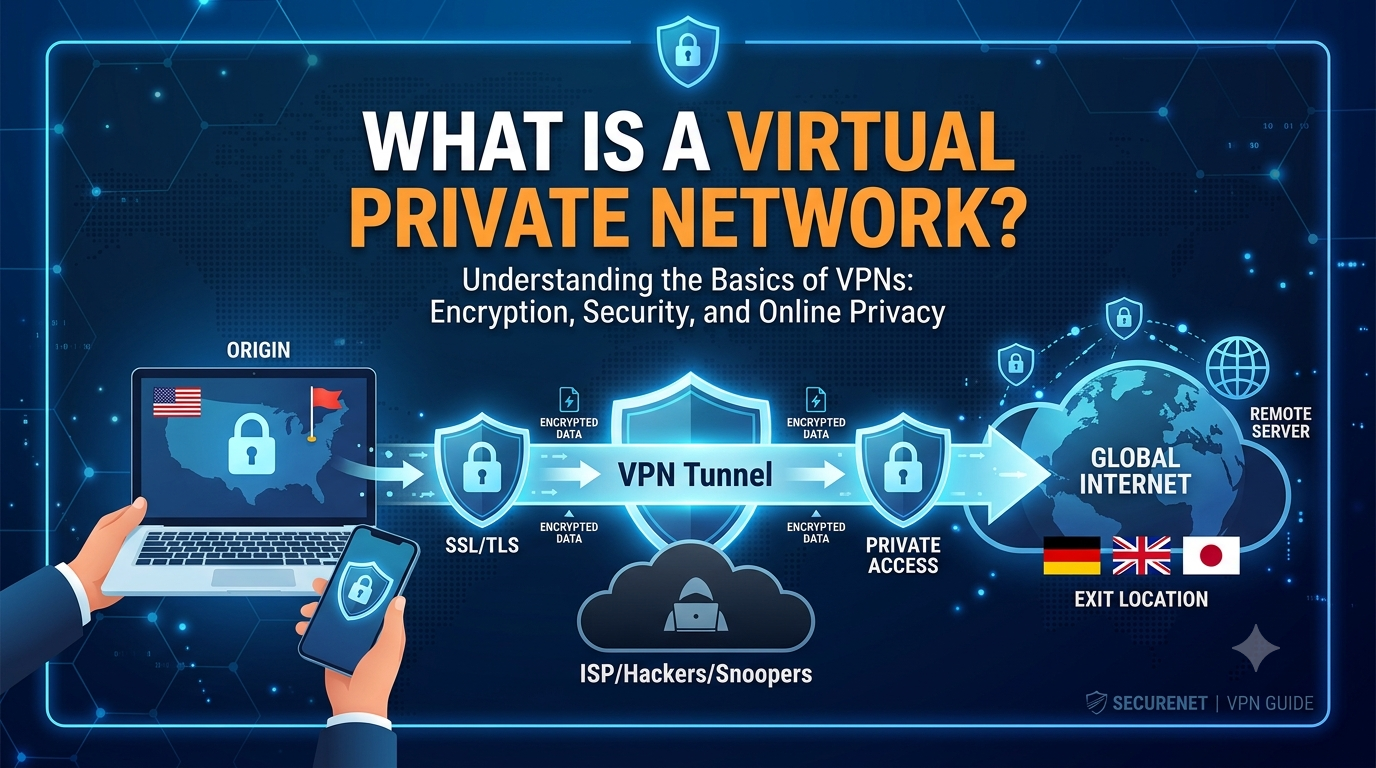
A Virtual Private Network (VPN) is a technology that creates an encrypted, private communication channel between your device and the internet — routed through a server controlled by the VPN provider. To every external observer — your internet service provider (ISP), your government, the website you’re visiting, or a hacker on the same Wi-Fi network — your traffic appears to originate from the VPN server rather than from you.
Think of it like this: normally, when you send a letter, the envelope shows your home address. Anyone handling it along the way can see where it came from. A VPN is like using a third-party mail forwarding service. You hand your letter to a trusted intermediary, they seal it in their own envelope with their address on it, and only they know you were the original sender.
A VPN does two fundamental things simultaneously: it encrypts your traffic (so nobody can read it) and it masks your IP address (so nobody can trace it back to you). Both happen automatically, for every connection, on every app on your device.
The word “virtual” refers to the fact that this private network exists as a software layer on top of public infrastructure — the regular internet. You don’t need dedicated physical cables or hardware. The “private” refers to the encryption and isolation that prevents outside parties from accessing or reading your communications. The word “network” simply acknowledges that it involves communication between multiple points.
VPNs were originally invented for corporate use — allowing employees to securely access company intranets from home. Today, consumer VPNs have evolved into powerful privacy tools used by hundreds of millions of people worldwide, for purposes ranging from bypassing geo-restrictions on streaming services to protecting sensitive communications in authoritarian regimes.
How a VPN Works — Step by Step
Understanding a VPN at a technical level requires understanding what normally happens when you visit a website — and then seeing exactly where a VPN changes that process.
Without a VPN: The Default Journey
When you type google.com into your browser, here’s what happens without a VPN:
Your device sends a DNS query to resolve “google.com” into an IP address — typically via your ISP’s DNS servers, meaning your ISP logs that you visited Google. Your device then sends HTTPS requests to Google’s servers. While the content of those requests may be encrypted by HTTPS, your ISP can still see the domain name (google.com), the timing, the frequency, and the data volume. Google sees your real public IP address. Any router or network device between you and Google can see your metadata.
With a VPN: The Encrypted Journey
Activate a VPN, and the same process changes fundamentally:
Step 1 — Your device connects to a VPN server. Before any browsing begins, your VPN client establishes an authenticated, encrypted connection to a VPN server — say, one in New York operated by NordVPN.
Step 2 — Your DNS queries go through the VPN. Instead of your ISP’s DNS, queries now go through the VPN provider’s DNS servers. Your ISP can no longer log which domains you visit.
Step 3 — All your traffic is encapsulated and encrypted. Your device wraps every outgoing data packet inside an additional encrypted outer packet — a process called tunneling (explained below). The outer packet is addressed to the VPN server. Its contents are unreadable to anyone without the encryption keys.
Step 4 — The VPN server decrypts and forwards. The VPN server receives your encrypted packet, decrypts it, and forwards the original request to google.com on your behalf. To Google, the request appears to come from the VPN server’s IP address — not yours.
Step 5 — The response travels back in reverse. Google sends the response to the VPN server, which encrypts it and sends it back to your device through the tunnel. Your device decrypts it and displays the page.
For a deeper technical walkthrough of this process, see our full guide: → How Does a VPN Work?
Your real IP address never reaches the destination. The ISP sees only encrypted data.
The entire sequence above happens in milliseconds — most users notice no meaningful performance difference compared to browsing without a VPN, particularly with modern protocols like WireGuard.
Tunneling and Encryption — The Technical Core
The two mechanisms that make a VPN work are tunneling and encryption. They are related but distinct concepts, and understanding both helps you evaluate the security of any VPN service.
What Is VPN Tunneling?
Tunneling is the practice of encapsulating one network protocol inside another. Your original data packet — say, an HTTP request — is wrapped inside a new packet that only your VPN client and server can interpret. The outer layer conceals the inner content and routes it through the VPN server.
Different VPN protocols use different tunneling mechanisms. Some create a tunnel at the Layer 2 level (appearing as if devices share the same local network), while others operate at Layer 3 (routing IP packets). For most consumer VPN use cases, this distinction doesn’t matter — what matters is the strength and speed of the encryption applied to the tunnel.
What Is VPN Encryption?
Encryption is the process of converting your readable data into an unreadable format using a mathematical algorithm and a key. Only someone with the correct decryption key can reverse the process.
Consumer VPNs overwhelmingly use AES-256 — Advanced Encryption Standard with a 256-bit key — for symmetric encryption of tunnel traffic. AES-256 is the same standard used by the US government to protect classified information. To brute-force it with current computing power would take longer than the age of the universe. It is, for all practical purposes, unbreakable.
But AES-256 is only half the story. Before your device and the VPN server can share an AES key, they need a secure way to exchange it — because if an attacker intercepts the key exchange, they can decrypt everything. VPNs solve this using asymmetric encryption, typically:
RSA-4096 or Elliptic Curve Diffie-Hellman (ECDH) for the initial key exchange. These algorithms allow two parties to establish a shared secret over an insecure channel without ever transmitting the secret itself — a remarkable piece of mathematics known as the Diffie-Hellman key exchange, invented in 1976 and still the backbone of internet security today.
Perfect Forward Secrecy
Quality VPN providers also implement Perfect Forward Secrecy (PFS). This means a new encryption key is generated for each session — sometimes every few minutes within a session. Even if an attacker somehow compromised one session key, they could not use it to decrypt past or future sessions. Look for PFS when evaluating any VPN provider; it’s a hallmark of serious security engineering.
The Kill Switch
A kill switch is a fail-safe that automatically blocks all internet traffic if the VPN connection drops unexpectedly. Without it, a momentary VPN outage would expose your real IP address to any server you were communicating with. All reputable VPN providers include a kill switch, and you should always enable it.
A critical vulnerability in poorly-built VPNs is the DNS leak — where your DNS queries bypass the encrypted tunnel and go directly to your ISP’s servers, revealing your browsing habits even though your IP appears masked. Always run a DNS leak test at dnsleaktest.com after connecting to any VPN to verify your queries are properly routed.
VPN Protocols — A Complete Comparison
A VPN protocol is the set of rules that defines how the encrypted tunnel is established and maintained. Different protocols make different trade-offs between speed, security, stability, and obfuscation. Here’s the full picture:
| Protocol | Speed | Security | Use Case | Status |
|---|---|---|---|---|
| WireGuard | Fastest | Excellent | General use, gaming, streaming. Lean codebase (~4,000 lines) makes it easy to audit. | Recommended |
| OpenVPN | Moderate | Excellent | Privacy-critical use cases, corporate deployments. Mature and extensively audited. | Still Solid |
| IKEv2/IPSec | Fast | Strong | Mobile devices — excellent at reconnecting after network switches (e.g., Wi-Fi to cellular). | Widely Used |
| L2TP/IPSec | Moderate | Adequate | Legacy support. Suspected NSA compromise. Avoid unless required. | Legacy |
| PPTP | Fast | Broken | No valid modern use case. Multiple known vulnerabilities. Never use. | Avoid |
| SSTP | Moderate | Strong | Windows-native. Good at bypassing firewalls that block other VPN traffic. | Windows Only |
| Lightway (ExpressVPN) | Very Fast | Excellent | Proprietary to ExpressVPN. Open-sourced and independently audited. WireGuard-class speed. | Proprietary |
| NordLynx (NordVPN) | Fastest | Excellent | WireGuard core wrapped with a double NAT layer to preserve no-logs compliance. NordVPN’s default. | Proprietary |
The short answer for most users: use WireGuard or your provider’s WireGuard-based protocol (NordLynx for NordVPN, Lightway for ExpressVPN). It’s faster than OpenVPN and equally secure for virtually all consumer use cases. If you’re in a country that actively blocks VPN traffic, look for a provider with obfuscation features — which disguise VPN traffic to look like regular HTTPS traffic.
Types of VPNs
Not all VPNs serve the same purpose. There are three main categories:
1. Remote Access VPN
The most common type for individual consumers. A user’s device connects to a VPN server over the internet. The VPN provider operates a network of servers globally, and the user can choose which server to connect through — selecting a UK server to access BBC iPlayer, for example, or a US server for American Netflix. This is what NordVPN, Surfshark, ExpressVPN, and most consumer VPN products offer.
2. Site-to-Site VPN
Used primarily by enterprises. Rather than individual devices connecting to a server, entire networks are linked — typically connecting branch offices to a headquarters network. The VPN tunnel exists between routers or dedicated VPN gateways, not individual devices. Employees on either end of the tunnel experience seamless access to shared resources as if they were on the same local network.
3. Business / Mobile VPN
Designed for corporate deployments where employees need persistent, secure access to company resources from mobile devices or remote locations. Often integrates with IAM systems and supports granular access controls. Products like NordLayer and Perimeter81 serve this category.
Double VPN / Multi-Hop
A premium feature offered by some providers (notably NordVPN and Proton VPN) that routes your traffic through two VPN servers in sequence. The second server never knows your real IP address — only the IP of the first server. This dramatically increases privacy at the cost of some speed, and is recommended for journalists, activists, or anyone with serious threat models.
VPN Pros and Cons — The Honest Picture
VPNs are powerful privacy tools, but they’re not magic. Here’s a complete, unvarnished breakdown:
✓ Advantages
- ✓ Hides your real IP address from websites and services
- ✓ Encrypts all traffic — essential on public Wi-Fi
- ✓ Prevents ISP from logging and selling your browsing data
- ✓ Bypasses geo-restrictions on streaming services
- ✓ Can reduce ISP bandwidth throttling on specific services
- ✓ Secures remote work connections to company networks
- ✓ Access region-locked pricing on software, flights, hotels
- ✓ Protects journalists and activists in high-risk environments
- ✓ Prevents network-level censorship in restricted countries
✗ Limitations
- ✗ Reduces internet speed (typically 10–30% with quality providers)
- ✗ Does not make you fully anonymous — provider can still see traffic
- ✗ Free VPNs often sell your data — the product you’re paying with is you
- ✗ Some streaming services actively block VPN IP ranges
- ✗ Cannot protect against browser fingerprinting or cookies
- ✗ Does not prevent malware or phishing attacks
- ✗ Quality providers cost $3–$10/month
- ✗ Illegal or restricted in a small number of countries
- ✗ May trigger CAPTCHAs or blocks on some sites
The VPN market is flooded with free options, and most of them are dangerous. A VPN requires significant infrastructure to operate — servers in dozens of countries, bandwidth, engineering staff. If you’re paying nothing, the service is monetizing you. Common practices among free VPN providers include logging and selling browsing data, injecting ads into web pages, and in some documented cases, selling user bandwidth to botnets. Our guide on free vs paid VPNs covers this in full detail. The short version: if you need a VPN, pay for one.
A VPN also does not protect you at the application layer. If you sign in to Google while connected to a VPN, Google still knows who you are — your authentication cookie identifies your account regardless of what IP address is visible. True anonymity requires much more than a VPN: a privacy-focused browser, disabling JavaScript, blocking trackers, and careful operational security.
For most users, though, a VPN closes the most common and most exploited privacy gaps: ISP surveillance, public Wi-Fi interception, IP-based tracking, and geo-blocking. That’s a meaningful set of protections worth having.
It’s also worth understanding how a VPN compares to similar tools. See our full breakdown: → VPN vs Proxy: Which Should You Use?
Who Needs a VPN — and When?
The honest answer is: most people benefit from a VPN in specific contexts, and some people need one all the time. Here’s a breakdown by use case:
Remote Workers and Digital Nomads
If you work from cafés, hotels, airports, or co-working spaces, you are routinely connecting to untrusted public Wi-Fi networks. These networks are a favorite hunting ground for MitM attackers who position themselves between your device and the router to intercept credentials, session cookies, and sensitive data. A VPN eliminates this attack vector entirely by ensuring all traffic is encrypted before it leaves your device — making the untrusted network irrelevant.
Streamers and Travelers
Streaming services including Netflix, Disney+, BBC iPlayer, and Hulu license their content on a per-region basis. Content available in the US may be unavailable in the UK, or vice versa. A VPN allows you to connect through a server in the target country and access the library as if you were physically present. Similarly, travelers abroad can maintain access to their home country’s content, banking portals, and local services.
Privacy-Conscious Users
In the US, ISPs have been legally permitted to sell user browsing data to advertisers since 2017. In the UK, the Investigatory Powers Act compels ISPs to retain 12 months of browsing history accessible to dozens of government agencies. If your ISP’s business model includes your data, a VPN ensures they have nothing useful to sell — they see only encrypted connections to a VPN server.
Journalists, Activists, and Researchers
For people operating in politically sensitive environments — reporting on corruption, organizing in authoritarian states, or conducting research on extremist groups — a VPN can be a critical security tool. The encryption prevents local network surveillance, the IP masking frustrates attribution, and providers with verified no-logs policies ensure that even a lawful demand for user data returns nothing useful. Pair with Tor for the highest threat models.
Gamers
Competitive gamers use VPNs to access games before their regional release, connect to servers in other regions to find less congested lobbies, and protect against DDoS attacks that rival players sometimes launch using the target’s exposed IP address. The speed trade-off of older protocols has largely been eliminated by WireGuard — many gamers report no perceptible latency increase on nearby VPN servers.
Torrent Users
P2P file sharing exposes your IP address to every other participant in the swarm — including copyright enforcement agencies that log IPs and issue DMCA notices. A VPN replaces your real IP with the VPN server’s IP, breaking the chain of attribution. Providers with strict no-logs policies and explicit P2P support — Private Internet Access, NordVPN, and Mullvad being the strongest — are recommended for this use case.
The VPN Industry in 2026 — By the Numbers
Understanding the VPN landscape helps you make better choices as a consumer and reveals why this technology has moved from corporate niche to mainstream necessity.
Several macro-level forces are driving this growth:
Government surveillance expansion. The UK’s Investigatory Powers Act, India’s periodic Telegram bans and VPN-reporting requirements, Australia’s metadata retention laws, and the US’s lack of comprehensive federal privacy legislation have pushed mainstream users toward VPNs as a structural response to policy, not paranoia.
Remote work normalization. The post-pandemic shift to distributed work made VPNs essential corporate infrastructure. Business VPN adoption has grown faster than consumer adoption in percentage terms, with products like NordLayer and Perimeter81 capturing enterprise market share from legacy corporate VPN solutions.
Streaming wars and geo-fragmentation. As streaming services multiply and regional licensing becomes more complex, the demand for geo-spoofing capability has created a permanent consumer segment that views VPNs primarily as streaming access tools.
Protocol evolution. The 2019 release of WireGuard eliminated the speed objection that previously kept casual users from adopting VPNs. VPN speeds with WireGuard-based protocols now routinely achieve 90–95% of raw internet speed — essentially invisible to most users.
The no-logs audit arms race. Consumer trust requires proof, not promises. NordVPN has now completed six independent no-logs audits, including a 2026 audit by Deloitte. Proton VPN has completed five consecutive annual audits. ExpressVPN, Surfshark, and Mullvad have all submitted to independent third-party verification. Unaudited no-logs claims have become a red flag rather than a selling point.
VPNs are legal in most countries, including the United States, United Kingdom, Canada, and Australia. A small number of countries — including China, Russia, Iran, North Korea, and the UAE — restrict or ban VPN use to varying degrees. Using a VPN does not make otherwise illegal activities legal. Our full guide covers the legal landscape in detail: Is a VPN Legal in Your Country?
The Best VPN Providers in 2026
The VPN market has hundreds of providers, ranging from excellent to outright dangerous. After evaluating logging policies, independent audits, protocol support, server networks, and track records, these are the providers that consistently earn recommendation:
- Servers 6,400+ / 111 countries
- Protocol NordLynx (WireGuard)
- No-logs Audits 6× (incl. Deloitte 2026)
- Connections 10 devices
- Price from $3.39/mo
- Servers 3,200+ / 100 countries
- Protocol WireGuard
- No-logs Audits Yes (SecuRing 2026)
- Connections Unlimited
- Price from $2.49/mo
- Servers 9,700+ / 117 countries
- Protocol WireGuard + Stealth
- No-logs Audits 5× consecutive
- Connections 10 devices
- Price from $4.99/mo
Other providers worth considering depending on your specific needs:
ExpressVPN — Consistently fastest speeds, proprietary Lightway protocol, strong streaming unblocking. Premium-priced but premium quality. Best for users who prioritize raw performance above all else.
Private Internet Access (PIA) — Strongest P2P and torrenting support, over 35,000 servers, open-source apps, advanced customization options. Best for power users and torrent-focused use cases.
Mullvad — The most privacy-extreme option. Accepts cash and cryptocurrency. Does not require an email address to sign up. Flat €5/month pricing with no long-term discount traps. Trusted by privacy researchers and security professionals.
IPVanish — Excellent speeds, no device limit, U.S.-based infrastructure. Strong option for users who want a large server network and straightforward apps without paying premium prices.
Frequently Asked Questions
The Bottom Line
A Virtual Private Network is not a luxury or a tool for people with something to hide. It’s a straightforward response to the structural reality of the modern internet: your ISP logs and monetizes your browsing, public networks are routinely intercepted, advertisers track you across every device, and content is artificially fragmented by geography.
A quality VPN addresses all of these problems simultaneously, for the cost of a cup of coffee per month. The technology — AES-256 encryption, WireGuard tunneling, independently audited no-logs policies — is mature, battle-tested, and accessible to anyone.
The remaining question is which provider to trust with your traffic. Start with NordVPN for the best all-around experience, Surfshark for the best value (unlimited devices), or Proton VPN if privacy is your primary concern. All three offer 30-day money-back guarantees — more than enough time to evaluate whether a VPN delivers real value for your specific situation.
Continue Reading